UDISE Plus Student Module 2026: Login, Registration & Status
The Unified District Information System for Education Plus, known as UDISE+, is an important program started by the Ministry of Education in India. One of its most important parts is the UDISE Plus Student Module. This section of the system helps schools collect, manage, and update information about students across the country.
The Student Module keeps student records organized and accurate. It helps schools and education officials track enrollment, monitor progress, and make better decisions. In this article, we will understand the purpose, main features, and importance of the UDISE+ Student Module in today’s education system.
What is the UDISE+ Student Module?
The Student Module in UDISE+ works as an online system where schools record and update student details. Schools use it to keep all student information organized in one place.
It stores:
- Personal details – Student’s name, date of birth, gender, caste, Aadhaar number, and other basic information.
- Academic details – Class, section, admission number, and whether the student moved to the next class.
- Facility details – Information about mid-day meals, free textbooks, school uniforms, and scholarships.
Schools update this information every year. The government studies this data to understand how students are doing in school. It also helps track the progress of children from weaker and disadvantaged backgrounds so they receive proper support.

Objectives of the UDISE Plus Student Module
Here are the main goals of the UDISE+ Student Module explained in simple words:
Keep Student Records Updated: Every student gets a unique ID number. This helps schools track each student correctly and avoid confusion.
Help the Government Make Better Plans: When schools enter correct information, the government can create better schemes and support programs for students.
Reduce Mistakes and Duplicate Entries: The system prevents the same student from being registered more than once. This keeps records clean and accurate.
Support Better Education Planning: District and state education officers use real data to decide where new teachers, classrooms, or facilities are needed most.
How to Login to the Student Module (Step-by-Step)
Follow these simple steps:
Step 1: Open the Official UDISE+ Portal
First, open your web browser.
Type the official UDISE+ website address https://sdms.udiseplus.gov.in in the search bar. Always check that you are on the correct government website before entering your username and password.
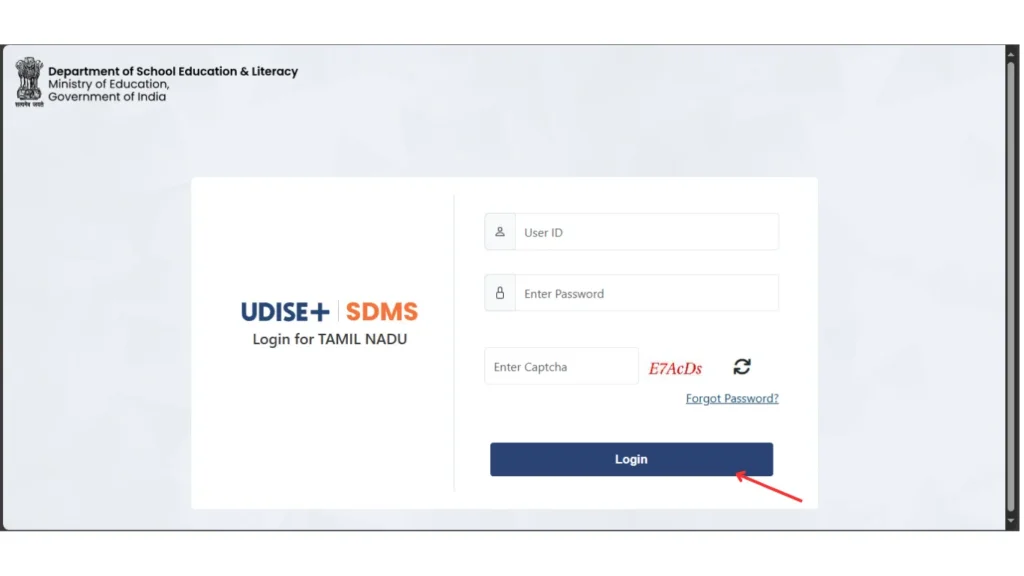
Step 2: Click on “Student Module (SDMS)”
- Once the homepage loads, look for the Student Module or SDMS option.
- Click on it. The system will redirect you to the Student login Module page.
Step 3: Enter Your Username
On the login screen, you will see a field for Username.
Enter the username provided to your school.
Make sure:
- You type it correctly
- There are no extra spaces
- Caps Lock is off (if not required)
Step 4: Enter Your Password
Now type your password carefully.
Remember:
- Passwords are case-sensitive
- Do not share your password with unauthorized persons
- Change your password regularly for security
If you forget your password, click on “Forgot Password” and follow the reset instructions.
Step 5: Fill in the Captcha Code
- Below the password field, you will see a captcha code.
- Type the exact characters shown in the image.
- If you cannot read it clearly, click the refresh icon to generate a new captcha.
Step 6: Click the Login Button
After entering:
- Username
- Password
- Captcha
Click on the “Login” button.
Understanding the UDISE Plus Student Module Dashboard
The dashboard shows important sections like:
- Add Student
- Update Student
- Search by PEN
- Verify Records
- Generate Reports
Always check notifications on the dashboard. The system sometimes shows deadlines for data submission.
How to Add a New Student
Adding a new student is simple.
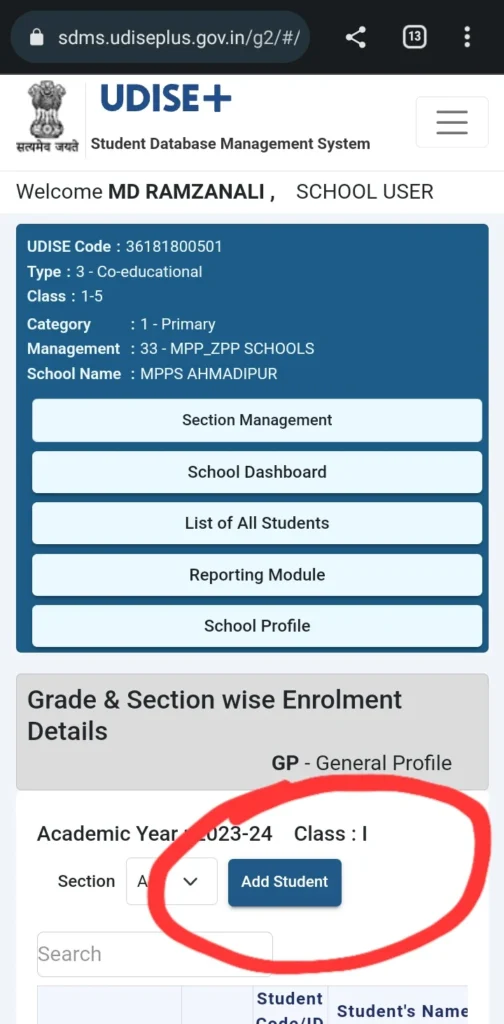
- Click Add Student.
- Enter personal details carefully.
- Fill academic details.
- Add benefit information.
- Submit the form.
- Generate PEN.
Double-check spelling before saving. Small errors can create big problems later.
Key Features of UDISE+ Student Module
PEN-Based Data Import: Schools can bring in student records from earlier years by using the student’s unique PEN and date of birth. This saves time and avoids entering the same details again.
Drop Box Option: If a student leaves the school or shifts to another school, staff can move that record to the Drop Box. This keeps the main list clean and updated.
Bulk Upload Feature: Schools can upload many student records at once using a special Excel file format. This makes the process faster, especially when adding large numbers of students.
Error Checking System: Before final submission, the system checks the data. It shows warnings if something is missing or incorrect, so schools can fix mistakes in time.
Reports and Analytics: Schools can create detailed reports based on students or classes. They can download these reports in Excel or PDF format for records and review.
Why is the Student Module Important?
The UDISE+ Student Module makes sure that every child studying in India becomes part of the official education record. Schools enter student details into this system so no child gets missed.
This system helps in many important ways:
- It helps reduce dropouts by spotting students who stop attending school and taking action early.
- It supports the Right to Education (RTE) by keeping track of student enrollment and attendance.
- It makes sure students receive benefits like free textbooks, school meals, and uniforms without delay.
- It helps the government plan better by showing where more classrooms or UDISE Plus Teacher Module are needed based on current data.
In simple words, the UDISE Plus Student Module keeps accurate records so schools and the government can support every child properly.
Annual Data Collection Process
Schools must update student data every year.
The process usually includes:
- Enrollment verification
- Promotion updates
- Dropout reporting
- Facility confirmation
Authorities set deadlines. Always submit data before the deadline to avoid issues.
How the Government Uses Student Module Data
The government studies the data to:
- Improve school facilities
- Allocate funds
- Track gender ratio
- Support marginalized communities
- Plan new teacher appointments
Accurate student data strengthens the entire education system.
FAQ’s
What is SDMS in UDISE+?
SDMS stands for Student Database Management System. It stores student records online.
Is Aadhaar mandatory?
Some states require Aadhaar, but schools can follow local guidelines.
Can parents access the UDISE Plus Student Module?
No. Only authorized school staff can log in at UDISE Plus Student Module.
How often should schools update data?
Schools must update data yearly and whenever major changes happen.
Conclusion
The UDISE+ Student Module does much more than store student information. It helps schools stay responsible and organized. When schools keep correct records for every student, they can make sure no child gets ignored. The system helps send support, scholarships, and other resources to the students who truly need them, at the right time.