UDISE Plus UP
UDISE Plus, which stands for Unified District Information System for Education Plus, is an online system used across India to manage school data. It helps collect and store information about schools, students, teachers, courses, and facilities in one central database.
In Uttar Pradesh, this system plays a major role in school management. Schools use it to register teachers, update student details, manage school records, and generate important reports. Through UDISE Plus Login, school staff can enter and update accurate information easily.
In this guide, you will find clear details about the UDISE Plus UP Login process, its benefits, the information required for login, and simple step-by-step instructions to use the system without confusion.
Required Information for UDISE Plus UP Login
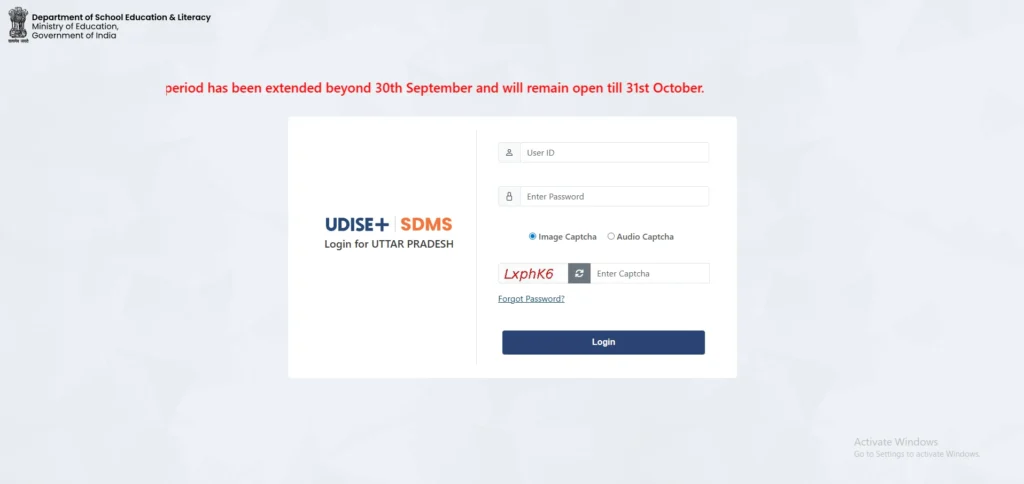
To log in to UDISE Plus UP – School Information System, you need a few basic details. Make sure you have them ready before you begin.
What You Need to Log In
- Username: This is the unique ID given to your school or teacher account.
- Password: A secure password provided by the school administration or department.
- Captcha Code: A security code shown on the screen. You must type it correctly to continue.
Logging in to UDISE Plus is simple. Just follow these easy steps:
Step 1: Visit the Official Website
Open your browser and go to the official UDISE+ Up website at https://udiseplus.gov.in.
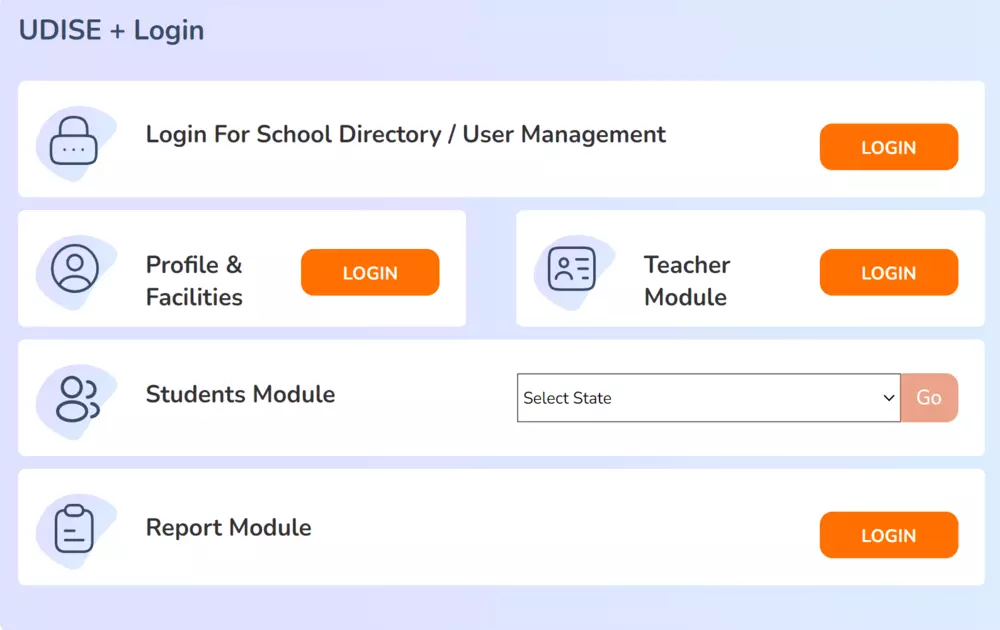
Step 2: Select UP Login or State Login
On the homepage, look for the option that says “UP Login” or “State Login.” Click on it to move to the login page.
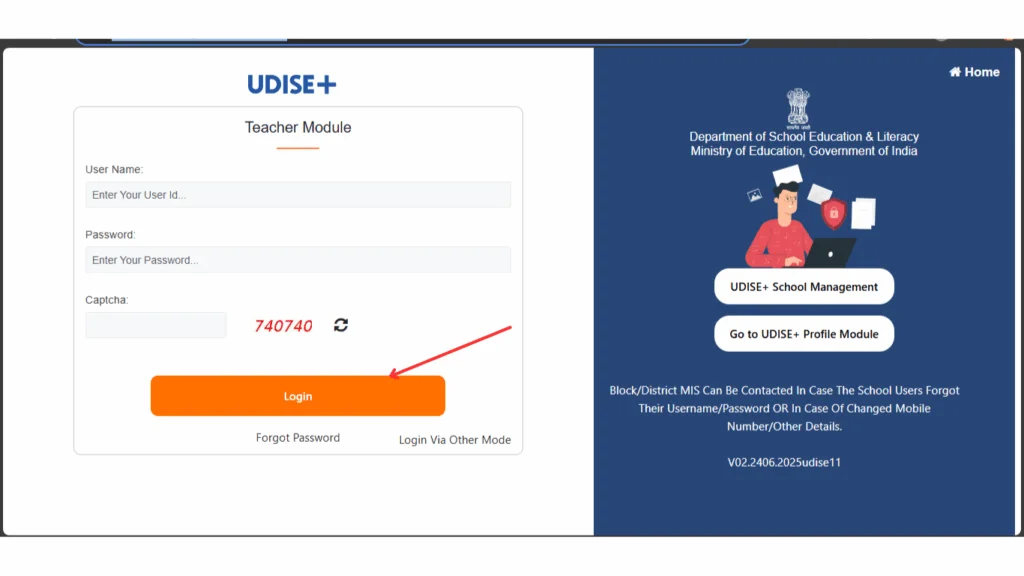
Step 3: Enter Your Username and Password
Type the username and password provided to your school or teacher. Make sure you enter the details correctly.
Step 4: Fill in the Captcha Code
You will see a captcha code on the screen. Enter the same code in the box given. This step helps keep the system secure.
Step 5: Click the Login Button
After checking all the details, click on the Login button.
If everything is correct, the system will open your UDISE Plus UP Dashboard.
That’s it! You are now ready to use the portal.
UDISE Plus UP Student Module (SDMS)
The Student Database Management System (SDMS) records and monitors every student enrolled in a school in Uttar Pradesh.
Schools must enter accurate UDISE Plus student module details, including:
- Full name of the student
- Gender
- Current class
- Aadhaar number (if available)
- Social category (SC/ST/OBC/General)
- Transfer history (if the student moved schools)

Once the entry is complete, the system generates a Permanent Education Number (PEN) for the student.
Why the PEN Number Matters
The PEN is more than just a number. It plays a key role in maintaining clean and reliable records.
It helps to:
- Stop duplicate student entries
- Track transfers from one school to another
- Support scholarship and benefit schemes
- Maintain continuous academic records
Before adding a new student, always search using the PEN. This simple step prevents errors in the system.
UDISE Plus UP Teacher Module
The UDISE Plus Teacher Module stores complete information about school staff. Schools must enter details carefully and update them when needed.
The system collects:
- Academic qualifications
- Subject expertise
- Total years of service
- Training and certifications
- Type of employment (permanent, contractual, etc.)
Education authorities use this data to:
- Calculate the Pupil–Teacher Ratio
- Identify areas with teacher shortages
- Plan new teacher recruitment
- Improve professional training programs
When teacher records remain accurate, planning at district and state levels becomes more effective.
School Infrastructure Data in UDISE+ UP
UDISE Plus also tracks the physical condition of schools. Every school must report accurate infrastructure details.
Required information includes:
- Total number of classrooms
- Availability of electricity
- Safe drinking water facility
- Separate and functional toilets for boys and girls
- Playground availability
- Boundary wall
- Internet connection
- Computer lab access
This information directly impacts funding and development decisions.
If a school reports incorrect data, it may miss out on infrastructure upgrades or financial support.
Know Your School (KYS) – Public Access Portal
The Know Your School (KYS) feature gives the public access to basic school information. Parents and citizens can check school records easily.
You can search using:
- UDISE Code
- School name
- District name
- PIN code
The portal displays:
- Student enrollment numbers
- Total teachers available
- Infrastructure facilities
- Recognition status of the school
This system promotes transparency and builds trust between schools and the public.
How to Add a Student in UDISE Plus UP
Follow these steps carefully:
- Log in to the SDMS portal.
- Click on “Add Student.”
- Enter all required details.
- Confirm the date of birth.
- Add Aadhaar number if available.
- Generate the PEN.
- Save the record.
Review every detail before final submission. Small mistakes can cause serious problems later.
How to Update Student Information
To make corrections:
- Search the student using the PEN.
- Click Edit next to the record.
- Update the required information.
- Save changes.
Avoid creating a new entry for an existing student. Duplicate records create confusion and reporting errors.
How to Download UDISE+ UP Reports
To access official reports:
- Log in to the Report Module.
- Select the academic year.
- Choose the district or school level.
- Click Generate Report.
- Download the file in PDF or Excel format.
These reports help during:
- School management meetings
- Parent discussions
- Government inspections
- Academic performance reviews
Accurate reporting strengthens school accountability and planning.
Benefits of Using UDISE Plus UP Login
Using the UDISE Plus UP portal makes school management easier and more organized. Here are the main benefits:
- All Data in One Place: The system stores school, teacher, and student information together. You do not need separate files or registers.
- Quick Report Creation: Schools and departments can create reports instantly. This saves time during inspections and meetings.
- Better Administration: Officials can apply education policies more smoothly because they have accurate data available.
- Student and Teacher Tracking: The portal keeps records of attendance, transfers, and academic progress. This helps schools monitor performance.
- Fewer Errors: Since everything is digital, mistakes are reduced compared to manual paperwork.
Tips for School Officers / Teachers:
- Update your school details every year without delay.
- Keep teacher attendance and student records correct and up to date.
- Record all school facilities and available resources regularly.
- Review all information carefully before submitting any reports.
UDISE Plus UP Mobile App
UDISE Plus UP also offers a mobile app for easier access.
With this app, teachers, school staff, and education officers can update school data directly from their phones. They can enter student and teacher details, check records, and generate reports without using a computer.
The app helps users manage school information quickly and conveniently, especially when they are not in the office.
FAQ’s
What is UDISE Plus UP?
UDISE Plus is the Uttar Pradesh version of the national UDISE+ education system. It is an online platform where schools in the state submit important information about students, teachers, and infrastructure. The government uses this data to understand the condition of schools and to plan improvements in the education system.
What is a UDISE Code?
A UDISE Code is a special identification number given to every recognized school. This number works like a school’s official ID. It helps the government and the public identify a school correctly and avoid confusion between schools with similar names.
What is PEN?
PEN stands for Permanent Education Number. It is a unique number given to each student in the UDISE Plus system. This number stays with the student even if they change schools. It helps track academic records and prevents duplicate entries.
Can parents access school information?
Yes, parents can check school details through the “Know Your School” feature. They can search using the school name or UDISE Code and view basic information such as enrollment numbers, teachers available, and facilities in the school.
Who manages UDISE Plus?
The Ministry of Education manages UDISE Plus at the national level. In Uttar Pradesh, state education departments and district officers handle the implementation and monitoring of the system.
Final Thoughts
UDISE Plus UP plays a major role in improving education across Uttar Pradesh. It does much more than collect data. It helps the government make smart decisions based on real information. When schools provide accurate data, funding reaches the right places, infrastructure improves, and teacher planning becomes more effective.
The system also improves transparency. Parents can check school information, and officials can monitor progress clearly. Student tracking becomes easier, and errors in records reduce over time.
If you are a school administrator, always enter data carefully and review it before submitting. If you are a parent, take time to verify your child’s school details. If you are a researcher or policymaker, use the reports responsibly to study trends and improve strategies.