What is UDISE+ and the Report Module?
The Unified District Information System for Education Plus (UDISE+) is India’s national digital platform for school education data under the Ministry of Education. It collects data from over 1.5 million schools, including enrollment, infrastructure, teachers, and student records, and provides real-time information to support planning and policymaking.
The UDISE Plus Report Module is the part of UDISE+ that lets you view, generate, analyse and download educational reports based on the data entered in various modules like student, teacher, school profile and more. It’s where raw data becomes useful, actionable information.
This guide explains step-by-step how it works, why it matters, and ways schools and education officials can use it for better decisions.
1. Why the Report Module Matters
The UDISE Plus system is more than a data entry tool – it’s a national education information backbone. It enables:
- 📊 Performance tracking: Enrollment, dropout, and transition trends across classes.
- 🧑🏫 Teacher and staff data summary: Workforce size, qualifications, and deployment.
- 🏫 Infrastructure insights: Availability of classrooms, electricity, toilets, labs, etc.
- 📋 School comparisons: School-wise, block-wise, district-wise and state-wise reporting.
- 📈 Planning & policy support: For Samagra Shiksha, NEP implementation, resource allocation and research.
In short, the Report Module lets policymakers, administrators, and school leaders see the bigger picture and measure progress accurately.
2. Who Can Use the Report Module?
The Report Module is designed for multiple users:
- ✅ School administrators: Download reports for their own school’s data.
- ✅ Block/District officials: View block- and district-level reports.
- ✅ State MIS officers: Access state-wide insights.
- ✅ Central planners and researchers: Use aggregated reports for national planning.
Access depends on your role and credentials in UDISE+. Schools typically use their UDISE code and password provided by the Block MIS coordinator.
3. How to Access the UDISE Plus Report Module
Using the Report Module involves a few clear steps:
Step-by-Step Login
- Open the UDISE+ portal at the official URL https://udiseplus.gov.in/udisereport/ for UDISE+ Reports.
- Enter your Username: the school’s 11-digit UDISE code.
- Enter your Password: provided by Block MIS or District MIS.
- Enter the Captcha displayed on the screen.
- Click Login to reach the Report Module dashboard.
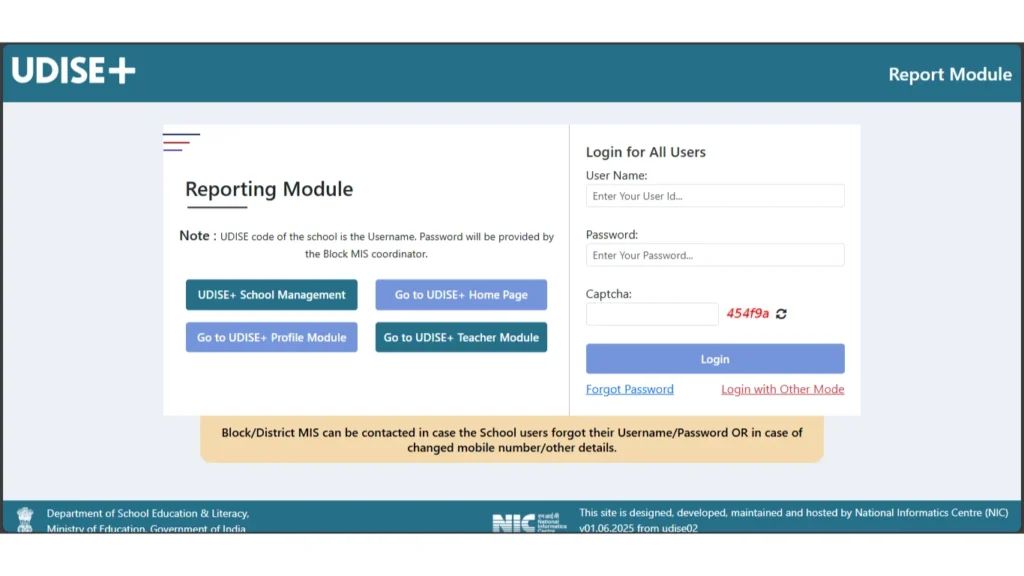
Once logged in, you will see a menu or dashboard where you can choose the type of report you want to generate.
Security tip: Always log out after finishing your session and never share passwords outside official use.
4. What Reports Can You Generate?
The UDISE Plus Report Module gives you a wide range of detailed outputs based on uploaded data. Common categories include:
📊 Enrollment Reports
- Class-wise student numbers (UDISE Plus student module)
- Gender breakdowns
- Social category and CWSN (children with special needs) statistics
- Retention and transition trends
🧑🏫 Teacher Reports
- Total number of teachers reporting (UDISE Plus Teacher Module)
- Teacher-student ratio summaries
- Qualifications and deployment status
🏫 Infrastructure Reports
- Availability of key facilities (toilets, labs, electricity, water)
- Digital readiness (internet, computers)
- Safety and accessibility features
📁 Consolidated and Custom Reports
- School, block, district, or state level summaries
- Comparative charts
- Year-on-year trend analysis
You can usually choose to download reports in PDF or Excel format for record-keeping or further analysis.
5. How to Generate a Report (Simple Steps)
Although interface layouts can differ slightly year to year, the basic steps are:
- Log in to the Report Module dashboard.
- Select the type of report you need (e.g., Enrollment, Infrastructure).
- Choose the geographic level (School, Block, District, State).
- Pick the academic year you want to report on.
- Click Generate or Download.
📌 PDF is great for printing and official submissions; Excel is better for custom data analysis and charts.
6. Best Practices for Using the Report Module
To make the most of the UDISE Plus Report Module:
- Update data regularly: Reports reflect what is entered in other modules (student, teacher, profile) – so accurate data is crucial.
- Verify before generating: Run quick preview summaries to catch data gaps early.
- Back up results: Save downloaded reports securely offline.
- Check trends over years: Compare multiple years to measure progress.
Accurate use of the Report Module helps schools plan improvements and spot issues early.
7. Real-World Impact of UDISE+ Reports
UDISE+ data now feeds into major national education findings:
- India’s total number of school teachers crossed 1 crore in 2024–25, showing workforce expansion for better education delivery.
- Student retention and transition rates have improved in recent years, indicating better learning continuity.
Reports also reveal infrastructure improvements and challenges such as digital gaps and dropout variations, informing policy actions at state and national levels.
8. Challenges and Tips
Common Issues
- Incorrect login credentials: Contact Block/District MIS coordinator for help.
- No access to higher-level reports: Some reports are restricted to District or State users.
- Incomplete data fields: Missing data leads to incomplete reports.
Tips
- Generate reports after final data verification for the best accuracy.
- Use Excel reports for custom charts and presentations.
- Coordinate with MIS officers to get access to broader reports if needed.
FAQs – UDISE Plus Report Module
Q1: Who can access the Report Module?
Schools, blocks, districts and states based on login credentials and official roles.
Q2: Can I download reports offline?
Yes – most reports can be saved in PDF or Excel format.
Q3: What if report data looks wrong?
Check the source modules (student, teacher, infrastructure) and re-submit corrected data before generating a new report.
Q4: Are reports updated in real time?
Reports show the latest submitted and verified data; frequency depends on when data is updated by schools/officers.
Q5: Can parents or public view reports?
Detailed reports require login; however, limited public data can be accessed via the “Know Your School” tool online.
Conclusion
The UDISE Plus Report Module is a powerful tool that changes raw school data into meaningful insights. It supports better decision-making, planning and monitoring across India’s education ecosystem – from individual schools to national planners. With accurate entries and regular checks, this report module becomes a major asset in improving education quality and transparency.